OnBoard™ IoT Security FW Signing and Pushing CLI - v1.0.0
1. Revision Record
| Version | Modified Date | Notes |
|---|---|---|
| v1.0.0 | 2025/02/17 | Initial release |
2. Overview
OnBoard™ IoT Security (OBIS) FW Signing and Pushing CLI is a command-line tool built specifically for OBIS, dedicated to firmware signing and pushing. It integrates several core functions, including key configuration based on the PKI (Public Key Infrastructure) certificate signing, KMS (Key Management System) firmware signing, public key export, and firmware pushing to OBIS.
This article introduces the common commands of the OBIS FW Signing and Pushing CLI and provides parameter descriptions and usage examples to help you efficiently complete firmware signing and pushing operations.
3. Syntax
snb [command] [subcommand] [parameters]
4. Command List
4.1 Key Configuration Command
Used to set the Access Key and Secret Key.
4.1.1 Command
config
4.1.2 Parameters
| Parameters | Type | Mandatory | Description |
|---|---|---|---|
--accessKey | string | Yes | Set the Access Key, which can be viewed in the user page in OBIS. |
--secretKey | string | Yes | Set the Secret Key, which can be viewed in the user page in OBIS. |
4.1.3 Example
snb config --accessKey <AK> --secretKey <SK>
4.2 Firmware Signing Command
Used to perform a signing operation on input data with the specified key pair.
4.2.1 Command
kms
4.2.2 Subcommand
sign
4.2.3 Parameters
| Parameters | Type | Mandatory | Description |
|---|---|---|---|
--algorithm | string | Yes | Configure the signing algorithm, currently supporting ecdsa_sha_256. |
--keyId | string | Yes | Specify the key ID to use for the signing operation. |
--inputFile | string | No | Specify the target file to be signed. |
--inputData | string | No | Input the data to be signed, in hexadecimal string format. |
--inputHash | string | No | Input the pre-hashed data to be signed, in hexadecimal string format. |
--outputFile | string | No | Specify the output file for the signature result, in the .der format. Defaults to standard output (stdout). |
--resourcePackageId | string | No | Specify the resource package ID for the product. This parameter is required when accessing the product keys. |
- At least one of the parameters (
inputFile,inputData, orinputHash) must be provided. - When outputting to standard output (stdout), the signature result in the .der format is represented as a hexadecimal string.
4.2.4 Example
snb kms sign --algorithm ecdsa_sha_256 --keyId <keyID> --inputFile ./firmware.bin --outputFile ./signedResult.der
4.3 Public Key Export Command
Used to export the public key of a specified key pair.
4.3.1 Command
kms
4.3.2 Subcommand
exportPubKey
4.3.3 Parameters
| Parameters | Type | Mandatory | Description |
|---|---|---|---|
--keyId | string | Yes | Specify the key ID to export. |
--outputFormat | string | Yes | Specify the output format for the exported key, options are PEM or DER. Default is DER. |
--outputFile | string | Yes | Specify the output file for the exported key. Defaults to standard output (stdout). |
--resourcePackageId | string | No | Specify the resource package ID for the product. This parameter is required when the Access Key used belongs to a personal account. |
When outputting to standard output (stdout), the signature result in the .der format is represented as a hexadecimal string.
4.3.4 Example
snb kms exportPubKey --keyId <keyID> --outputFormat PEM --outputFile pubKey.pem
4.4 Certificate Signing Command (such as Matter DAC)
Used to sign a certificate signing request (CSR) file using the specified certificate template.
4.4.1 Command
pki
4.4.2 Sub-command
sign
4.4.3 Parameters
| Parameters | Type | Mandatory | Description |
|---|---|---|---|
--inputFormat | string | Yes | Specify the input format (PEM or DER). Default is PEM. |
--certTemplateId | string | Yes | Specify the certificate (such as Matter DAC) template ID. |
--outputFormat | string | Yes | Specify the output file format(PEM or DER). Default is DER. |
--csrFile | string | No | Specify the path of the CSR file. |
--csrContent | string | No | Provide the content of the CSR file. |
--outputFile | string | No | Specify the output filename. Defaults to standard output (stdout). |
- At least one of the parameters (
csrFileorcsrContent) must be provided. - When outputting to standard output (stdout), the signature result in the .der format is represented as a hexadecimal string.
4.4.4 Example
snb pki sign --csrFile ./csr.der --inputFormat DER --certTemplateId 1F118749-EEB1-11EF-A430-B8CEF6C25058
4.5 Firmware Push Command
Used to push the signed firmware file to OBIS.
4.5.1 Command
obis
4.5.2 Subcommand
push
4.5.3 Parameters
| Parameters | Type | Mandatory | Description |
|---|---|---|---|
--file | string | Yes | Specify the file to be pushed to OBIS. |
--fileType | string | Yes | Specify the type of the file being pushed: Application (default), Bootloader, or Others. |
--resourcePackageId | string | Yes | Specify the resource package ID under the target product in OBIS. |
--env | string | Yes | Specify the target environment for pushing: TEST or PROD. |
--startAddress | string | No | Specify the firmware programming start address, in hexadecimal format starting with 0x. |
--version | string | No | Set the firmware file version, with a maximum length of 16 characters. Allowed characters include text, numbers (0-9), letters (a-z, A-Z), dot (.), underscore (_), and hyphen (-). |
- When the file being pushed is in the .bin format, the
startAddressparameter is required. - The combination of
version,env, andfilemust be unique and can't be duplicated.
4.5.4 Example
snb obis push --file ./lighting.s37 --fileType Application --resourcePackageId <id> --env TEST --version 1.0.0
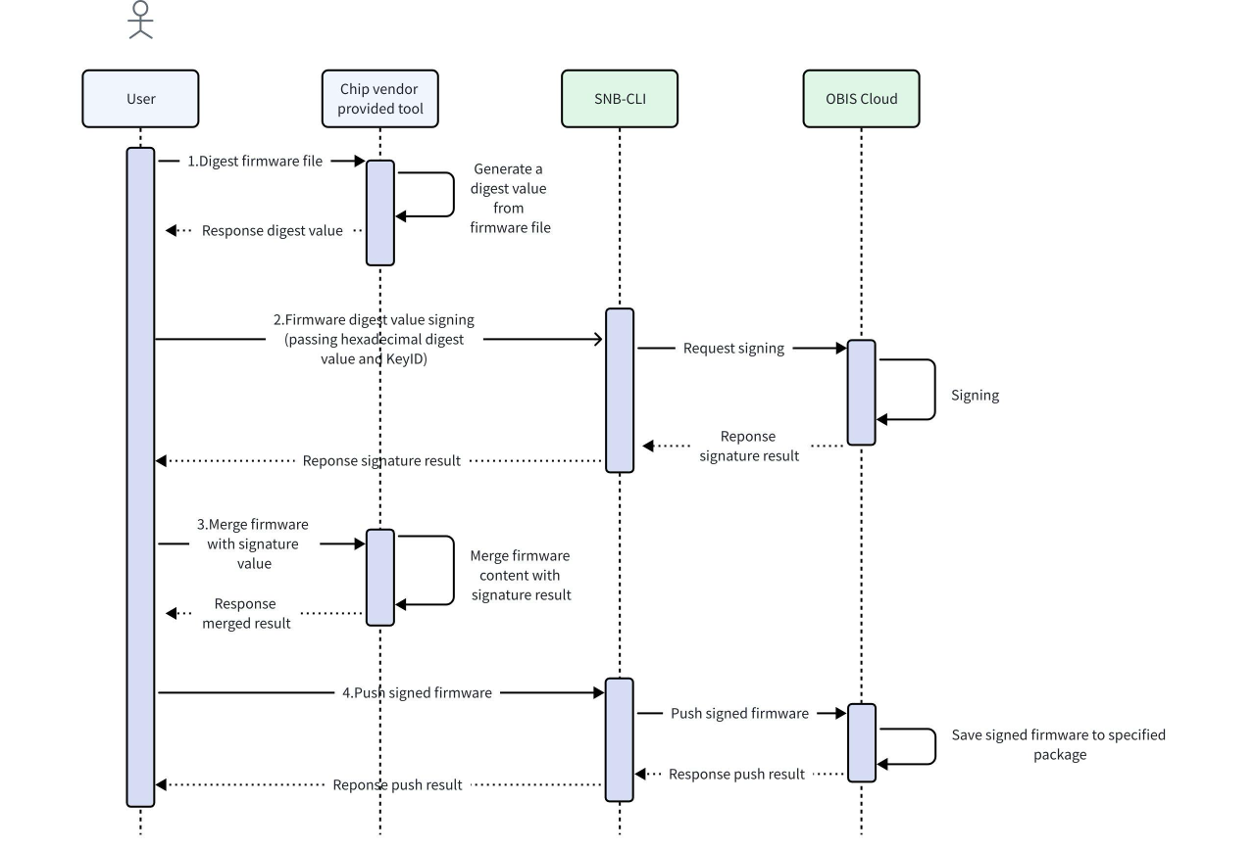
5. Execution Flow Example

 Download User Manual