OnBoard™ IoT Security Programming CLI - v3.0.5
1. Revision Record
| Version | Modified Date | Notes |
|---|---|---|
| v1.0.0 | 2025/05/12 | Initial release |
| v3.0.0 | 2026/01/22 | Added the following nine commands:
Deleted the following three commands:
Updated the following two commands:
|
| v3.0.1 | 2026/03/13 | The --stationId parameter in the "Log in to Edge Service" command is now optional instead of mandatory |
| v3.0.2 | 2026/03/17 | In the Query Programming Script command section, add instructions for downloading the programming script, and update the corresponding command example |
| v3.0.3 | 2026/06/02 |
|
| v3.0.4 | 2026/09/19 |
|
| v3.0.5 | 2026/09/22 | Added the Execute Batch APDU Operation command, including parameters, call examples, HTTP mapping, response, and exit code descriptions |
2. Overview
OnBoard™ IoT Security (OBIS) Programming CLI is a command-line tool built specifically for OBIS, dedicated to supporting the device programming process. It offers a comprehensive set of features: you can use it to log in to the Edge Service, query Identity U-Safe list, retrieve and upload batch data, upload programming results, and query or download programming scripts.
This article introduces common OBIS Programming CLI commands, with parameter descriptions and usage examples to help you perform device programming and related operations. It also explains how the UI (Programming Station client) starts device programming through PPCLI (Programming Process Control CLI) or a dedicated programming interface, and covers the full call flow from login, batch and programming script preparation through device programming and result handling.
3. OBIS Programming CLI Syntax
obiscli [command] [subcommand] [parameters]
Strings containing spaces in command-line arguments must be enclosed in double quotes "; otherwise, the command may fail to parse.
- Correct Example:
--chipVendor="Test Labs" - Error Example:
--chipVendor=Test Labs
4. OBIS Programming CLI Commands
4.1 Query Tool Help
Used to query the usage instructions of the command-line tool and the list of available parameters.
4.1.1 Parameter
--help
4.1.2 Example
obiscli.exe --help
positional arguments:
                 OBIS CLI Tool Command
    login        Login to OBIS Local Service.
    logout       logout to OBIS Local Service.
    usafe        OBIS usafe commands.
    batch        OBIS batch commands.
    script       OBIS batch commands.
    obisexe      OBIS commands.
    logCollect   OBIS batch commands.
    addPath      add sys Path.

options:
  -h, --help     show this help message and exit
  -v, --version  Displays version information.
  -r, --release  Displays release information.
4.2 Log in to Edge Service
Used to log in to the Edge Service.
4.2.1 Command
login
4.2.2 Parameters
| Parameters | Type | Mandatory | Description |
|---|---|---|---|
--ip | string | Yes | Programming Station client IP, default value: 127.0.0.1 |
--port | string | Yes | Programming Station client port, default value: 32333 |
--stationId | string | No | Programming Station ID |
--stationVersion | string | No | Version of the Programming Station client |
--factorytype | string | No | Factory type, default value: local |
--password | string | No | Login password, required only when password-based login is enabled |
--usafesn | string | No | U-Safe serial number |
4.2.3 Example
# no-password login:
obiscli login --ip=192.168.40.100 --port=32333 --stationId 81045379
# u-safe login:
obiscli login --ip=192.168.40.100 --port=32333 --usafesn=00003F00AB013668 --stationId 81045379
# password login:
obiscli login --ip=192.168.40.100 --port=32333 --password=12345678 --stationId 81045379
or
obiscli login --ip=192.168.40.100 --port=32333 --password=12345678
output:
{
    "stationid": "94221070",
    "token": "b69a9fe7-9df4-4bdc-819e-9b84a7bc0b23",
    "tokenexpire": "unlimited"
}
4.3 Log out of Edge Service
Used to log out of the Edge Service.
4.3.1 Command
logout
4.3.2 Example
# Logout
obiscli logout
4.4 Query Login Type
Used to query the login type for the Edge Service.
4.4.1 Command
login
4.4.2 Subcommand
queryType
4.4.3 Parameters
| Parameters | Type | Mandatory | Description |
|---|---|---|---|
--ip | string | Yes | Programming Station client IP, default value: 127.0.0.1 |
--port | string | Yes | Programming Station client port, default value: 32333 |
--stationId | string | Yes | Programming Station ID |
4.4.4 Example
obiscli login queryType --ip=192.168.40.205 --port=32333 --stationId=97123586

output:(1 No password, 2 Password, 3 U-safe)
{
    "loginType": 3
}
4.5 Query Login Options
Used to query the specific login options for the Edge Service.
4.5.1 Command
login
4.5.2 Subcommand
queryoptions
4.5.3 Parameters
| Parameters | Type | Mandatory | Description |
|---|---|---|---|
--ip | string | Yes | Programming Station client IP, default value: 127.0.0.1 |
--port | string | Yes | Programming Station client port, default value: 32333 |
--usafesn | string | Yes | U-Safe serial number |
--factoryType | string | No | Factory type, default value: local |
--stationId | string | No | Programming Station ID |
4.5.4 Example
obiscli login queryoptions --factoryType=local --ip=192.168.40.100 --port=32333 --usafesn=00003F00AB013668
4.6 Query Identity U-Safe List
Used to list the Identity U-Safes inserted in the local device.
4.6.1 Command
usafe
4.6.2 Subcommand
list
4.6.3 Example
obiscli usafe list
output:
{
    "usafelist": [
        {
            "usafesn": "0001BC00B86DA2BB"
        }
    ]
}
4.7 Query Batch Information
Used to query information about the batch corresponding to the devices to be programmed.
4.7.1 Command
batch
4.7.2 Subcommand
query
4.7.3 Example
obiscli batch query

output:
{
    "batches": [
        {
            "batchId": "7346273795440640",
            "batchName": "UI-jason-0925",
            "chips": [
                {
                    "chipPart": "QPG6200",
                    "chipVendor": "Qorvo",
                    "objectid": "4bb81efb504248fe813c83a4ed4602ac"
                }
            ],
            "env": "test",
            "extData": "VID : 0xFFF2  PID : 0x8001",
            "mark": "",
            "notes": "",
            "orderNo": "",
            "produced": 0,
            "productName": "pn",
            "toBeProduced": 100,
            "total": 100,
            "version": "UI-test-0925",
            "region": "",
            "assignStation": null,
            "scriptName": "Qorvo-UI-test-0925.zip",
            "scriptUrl": "http://127.0.0.1:32333/api/iot-factory-edge-service/download?fileId=1971056408956178434&fileName=1ab0f4bf62f79dba4bb4d126ed91518a.zip"
        }
    ]
}
4.8 Query Batch List
Used to query the batch list associated with a factory order number.
4.8.1 Command
batch
4.8.2 Subcommand
queryList
4.8.3 Parameter
| Parameter | Type | Mandatory | Description |
|---|---|---|---|
--orderNumber | string | Yes | Order number |
4.8.4 Example
obiscli batch queryList --orderNumber "LDS-19990101-1030BTC"

output:
[
    {
        "batchId": "8725582734950400",
        "batchName": "Test-Order-5"
    }
]
4.9 Assign Batch
Used to bind the batch to the programming station.
4.9.1 Command
batch
4.9.2 Subcommand
assign
4.9.3 Parameter
| Parameter | Type | Mandatory | Description |
|---|---|---|---|
--batchId | string | Yes | Batch ID |
4.9.4 Example
obiscli batch assign --batchId 7176076344164352

output:
{
    "batches": [
        {
            "batchId": "7346273795440640",
            "batchName": "UI-jason-0925",
            "chips": [
                {
                    "chipPart": "QPG6200",
                    "chipVendor": "Qorvo",
                    "objectid": "4bb81efb504248fe813c83a4ed4602ac"
                }
            ],
            "env": "test",
            "extData": "VID : 0xFFF2  PID : 0x8001",
            "mark": "",
            "notes": "",
            "orderNo": "",
            "produced": 0,
            "productName": "pn",
            "toBeProduced": 100,
            "total": 100,
            "version": "UI-test-0925",
            "region": "",
            "assignStation": null,
            "scriptName": "Qorvo-UI-test-0925.zip",
            "scriptUrl": "http://127.0.0.1:32333/api/iot-factory-edge-service/download?fileId=1971056408956178434&fileName=1ab0f4bf62f79dba4bb4d126ed91518a.zip"
        }
    ]
}
4.10 Query Batch Full Data
Used to query the complete data to be programmed into a device. This command is typically called by PPCLI or a vendor programming script; the UI does not need to call it directly.
4.10.1 Command
batch
4.10.2 Subcommand
getfulldata
4.10.3 Example
obiscli batch getfulldata
4.11 Query Batch Fixed Data
Used to query fixed data to be programmed into a device. This command is typically called by PPCLI or a vendor programming script; the UI does not need to call it directly.
4.11.1 Command
batch
4.11.2 Subcommand
getFixData
4.11.3 Example
obiscli batch getFixData
4.12 Query Batch Changed Data
Used to query changing data to be programmed into a device. This command is typically called by PPCLI or a vendor programming script; the UI does not need to call it directly.
4.12.1 Command
batch
4.12.2 Subcommand
getChangingData
4.12.3 Example
obiscli batch getChangingData

output:
{
    "batchId": "7115488079380480",
    "batchName": "V1.8.5 Dual Button 0906 MP",
    "bundles": [
        {
            "type": "dataBundle",
            "section": "Matter configuration",
            "items": [
                {
                    "itemId": "e8bbfea5a22d4a61b9598aa91768da59",
                    "key": "matterCommissioningParameter",
                    "objectId": "bf8e0546d8c94df9ab8b1515ce8549a0",
                    "parentId": "5782007674044416",
                    "fieldType": "MatterCommissioningParameter",
                    "attribute": {
                        "iterations": 10000,
                        "saltLength": 32,
                        "commissioningFlows": "0",
                        "discoverableMode": "2",
                        "vid": "117C",
                        "pid": "8001",
                        "salt": "tfuoTUAvBYS7SNuKPZFCZ9A3TyZcFP96/13hD7IazAc=",
                        "verifier": "JKIVX20r6RPyUGGr0ah2bmfBYnjwSBTVPPpMb4pI6WsEIfzUR/y1CHKGTUwAx0lOksfqsX+Pok4I67rwhdyD9d5wH1YdmHZWiUDh/0zQ5JpxwcEyYvVRDAviOPK4wRLuTQ==",
                        "manualCode": "06092517162",
                        "qrcode": "MT:EX7A0-C714OGWX2MM00",
                        "passcode": "28126717",
                        "uniqueid": "7DdztBdDed9qR8JS0AjJhQ==",
                        "discriminator": "900",
                        "enableRotatingDeviceId": true
                    }
                }
            ]
        },
        {
            "type": "dataBundle",
            "section": "Factory data",
            "items": [
                {
                    "itemId": "5916073910c24104b32d39b4942fa276",
                    "key": "manufacturingDate",
                    "objectId": "27fb6209dca147b9be9f4e0ab3051135",
                    "parentId": "5782007674044416",
                    "fieldType": "String",
                    "attribute": {
                        "value": "20250925"
                    }
                }
            ]
        }
    ],
    "uuid": "8a21200d-0be4-4ce6-8cdf-a0b02c33ba50"
}
4.13 Push Batch Data
Used to push data to the Edge Service. This command is typically called by PPCLI or a vendor programming script; the UI does not need to call it directly.
4.13.1 Command
batch
4.13.2 Subcommand
putdata
4.13.3 Parameters
| Parameters | Type | Mandatory | Description |
|---|---|---|---|
--batchId | string | Yes | Batch ID |
--chipVendor | string | Yes | Chip vendor name, for example: Silicon Labs |
--chipPart | string | Yes | Chip part |
--data | json | Yes | Push data |
--uuid | string | Yes | Universally unique identifier |
4.13.4 Example
obiscli batch putdata --uuid=24a1c3da-459a-429b-a717-29989f926d43 --batchId=4808741360762880 --chipVendor="Silicon Labs" --chipPart=EFR32MG24B210F1536IM48 --data="{\"bundles\": [{\"items\": [{\"key\": \"dacTemplate\", \"response\": [{\"csr\": \"MIHmMIGNAgEAMCsxKTAnBgNVBAMMIERBQyA1SFNmblpxVSBNdmlkOjE0NDEgTXBpZDowMTIzMFkwEwYHKoZIzj0CAQYIKoZIzj0DAQcDQgAEXeJ5k1UtgF7YJDRm37XvHu47mTqIag4lCixpNGOMHtyOXFFpd25H4+deESQj5V3E4bRT/FNF1JjcucbEgaIR+KAAMAoGCCqGSM49BAMCA0gAMEUCIQDeR2rM9FOdCg1GTJyAOpQR2FtARVwIw3nEjXv9t7mg6wIgBcvUbH1G8NAlB/I7rOY48b/Fgnf5UkEOMx/7eekcU0k=\"}]}], \"section\": \"section\"}]}"
4.14 Execute Batch APDU Operation
Used to execute an APDU (Application Protocol Data Unit) operation through the platform service in programming flows that require APDU interaction. This command is typically called by PPCLI or a vendor programming script; the UI does not need to call it directly.
4.14.1 Command
batch
4.14.2 Subcommand
executeApdu
4.14.3 Parameters
| Parameter | Type | Mandatory | Description |
|---|---|---|---|
--batchId | string | Yes | Current programming batch ID. It must match the batch to which this device data belongs. |
--uuid | string | Yes | uuid of this device data or programming record. Use the identifier obtained in the current programming flow; do not substitute the adapter serialno. |
--data | string | No | Additional request fields as a JSON object. After parsing, they are merged into the top level of the request body. Examples include programmingTraceId and command response data required by the server protocol. Follow the actual server protocol for field names, types, and which stages require them. |
--batchIdand--uuidare not marked required by the current argument parser, but the command does not fill them in from the assigned batch or data cache. Supply validbatchIdanduuidvalues. If omitted, their request values arenull; final business validation is performed by the server.- Log in first and obtain identifiers for the current batch and device data. OBIS Programming CLI reads the service address and session token from local configuration; do not pass login parameters again.
--datamust be a valid JSON object, not a file path, plain string, or array. The current implementation merges its fields directly into the top level of the request body, without adding adatalayer. Duplicate fields overwrite existing values, so do not repeatbatchIdoruuidin--data.- This command does not support
--chipVendor,--chipPart, or--serialno. - Whether
executeApdumust be called more than once, how to submit the previous command response, and how to determine when the APDU flow is complete depend on the server protocol.
4.14.4 Examples
Without additional request fields:
obiscli batch executeApdu --batchId="<BATCH_ID>" --uuid="<UUID>"
When programmingTraceId is required, add other business fields according to the server protocol:
obiscli batch executeApdu --batchId="<BATCH_ID>" --uuid="<UUID>" --data="{\"programmingTraceId\":\"<PROGRAMMING_TRACE_ID>\"}"
The two examples show alternative argument forms; they do not mean the command must be run twice in succession. Follow the actual server protocol for the use of --data and the business fields it contains.
The \" escaping in --data above applies to the Windows cmd.exe example. When an application invokes the process API, pass the JSON string directly in the argument array, without additional shell quotes or escaping.
4.14.5 HTTP Mapping
OBIS Programming CLI sends executeApdu requests to the following endpoint:
| Item | Description |
|---|---|
| Method | POST |
| Path | /api/iot-factory-edge-service/executeApdu |
| Content-Type | application/json |
| Session | x-snbps-session uses the current login token |
| Request ID | x-snbps-request-id is generated automatically by OBIS Programming CLI |
| Timestamp | x-snbps-timestamp is generated automatically by OBIS Programming CLI |
Local mode uses the saved IP and port. Cloud mode uses the saved host and automatically includes factoryId when configured.
For example, a command containing programmingTraceId produces this request body:
{
  "uuid": "<UUID>",
  "batchId": "<BATCH_ID>",
  "programmingTraceId": "<PROGRAMMING_TRACE_ID>"
}
4.14.6 Response and Exit Codes
After parsing the HTTP response, OBIS Programming CLI formats respData itself as JSON and exits with code 0 when respCode is the string "8000" and respData is not null.
The CLI does not also output the outer respCode and respMsg. The server defines the business structure of respData; the current CLI does not prescribe fixed fields.
| Exit code | Description |
|---|---|
0 | This interface call succeeded. The calling script must still process the response according to the business protocol; this does not establish that the full device programming flow is complete. |
1 | --data is not valid JSON text. |
45 | The HTTP client call failed. The CLI outputs executeApdu failed: Network error |
46 | respData is missing or null in a successful response. The current implementation does not return this error solely for an empty object {} or empty array []. |
Integer converted from the server respCode | When respCode is not "8000", the CLI outputs respMsg and exits with the corresponding business error code. |
200 | An uncaught exception occurs, for example when the response cannot be parsed or a business error code cannot be converted to an integer. |
After the APDU step, PPCLI or the vendor programming script continues the original programming flow and reports the final programming result with batch putresult. executeApdu does not replace batch putresult.
4.15 Push Programming Results
Used to push programming results to the Edge Service. This command is typically called by PPCLI or a vendor programming script; the UI does not need to call it directly.
4.15.1 Command
batch
4.15.2 Subcommand
putresult
4.15.3 Parameters
| Parameters | Type | Mandatory | Description |
|---|---|---|---|
--batchId | string | Yes | Batch ID |
--changeKeys | string | Yes | If service data is not used, enter the key. Supported keys are defined in the list of queryKeys V2 |
--result | string | Yes | Programming results |
--uuid | string | Yes | Universally unique identifier |
4.15.4 Example
obiscli batch putresult --batchId=4808741360762880 --uuid=24a1c3da-459a-429b-a717-29989f926d43 --result=success --changeKeys=''
4.16 Push Programming Events
Used to push programming events to the Edge Service.
4.16.1 Command
batch
4.16.2 Subcommand
uploadEvent
4.16.3 Parameters
| Parameters | Type | Mandatory | Description |
|---|---|---|---|
--batchId | string | Yes | Batch ID |
--uuid | string | Yes | Unique device identifier |
--event | string | No | Programming events |
4.16.4 Example
obiscli batch uploadEvent --batchId=4808741360762880 --uuid=24a1c3da-459a-429b-a717-29989f926d43 --event "{\"uuid\":\"24a1c3da-459a-429b-a717-29989f926d43\", \"events\": [{\"eventName\": \"Generate Trace ID\", \"timestamp\": \"2026-01-09T09:46:02.672Z\", \"source\": \"script\", \"priority\": \"1\", \"status\": \"success\", \"content\": \"\"}, {\"eventName\": \"Fetch Batch Dynamic Data\", \"timestamp\": \"2026-01-09T09:46:04.538Z\", \"source\": \"script\", \"priority\": \"1\", \"status\": \"success\", \"content\": \"\"}, {\"eventName\": \"Fetch Device ID\", \"timestamp\": \"2026-01-09T09:46:07.340Z\", \"source\": \"script\", \"priority\": \"1\", \"status\": \"success\", \"content\": \"\"}, {\"eventName\": \"Fetch CSR\", \"timestamp\": \"2026-01-09T09:46:27.433Z\", \"source\": \"script\", \"priority\": \"1\", \"status\": \"success\", \"content\": \"\"}, {\"eventName\": \"Program Factory Data\", \"timestamp\": \"2026-01-09T09:46:33.631Z\", \"source\": \"script\", \"priority\": \"1\", \"status\": \"success\", \"content\": \"\"}, {\"eventName\": \"Report Programming Result\", \"timestamp\": \"2026-01-09T09:46:35.726Z\", \"source\": \"script\", \"priority\": \"1\", \"status\": \"failure\", \"content\": \"['[ERROR][ppcli]1200000486:Command failed with exception: 2\\n result.exit_code:2 retry_times:1.']\"}]}"
4.17 Query Programming Script
It is recommended to directly use the Query Batch Information command (batch query) to obtain the batch information for the devices to be programmed, retrieve the script download link, and then execute the Download Programming Script command (script download) to perform the download.
Used to check whether a programming script exists for the batch to be programmed.
4.17.1 Command
script
4.17.2 Subcommand
query
4.17.3 Parameters
| Parameters | Type | Mandatory | Description |
|---|---|---|---|
--batchId | string | Yes | Batch ID |
--chipPart | string | No | Chip part |
--chipVendor | string | No | Chip vendor name, for example: Silicon Labs |
--productId | string | No | Product ID |
4.17.4 Example
When scriptExist is false, the script should be downloaded by executing the Download Programming Script command (script download); if true, downloading is not required.
obiscli script query --batchId=4808741360762880 --chipVendor="Silicon Labs" --chipPart=EFR32MG24B210F1536IM48
output:
{
    "scriptExist": bool,
    "path": ...
}
4.18 Download Programming Script
Used to download the programming script.
4.18.1 Command
script
4.18.2 Subcommand
download
4.18.3 Parameters
| Parameters | Type | Mandatory | Description |
|---|---|---|---|
--url | string | Yes | Download link for the programming script |
--extractFolder | string | No | Extraction path after downloading the programming script |
--savePath | string | No | Save path after downloading the programming script |
4.18.4 Example
obiscli script download --url="http://192.168.40.171:8005/api/iot-factory-edge-service/download?fileId=1866310684527935298&fileName=0d232bf966e516f4bf2a75e1880e59ee.zip" --savePath="C:\\Users\\Administrator\\AppData\\Roaming\\SNB\\chipVendorCmd" --extractFolder="C:\\Users\\Administrator\\AppData\\Roaming\\SNB\\chipVendorCmd"
4.19 Extract Programming Script
Used to extract the programming script.
4.19.1 Command
script
4.19.2 Subcommand
extract
4.19.3 Parameters
| Parameters | Type | Mandatory | Description |
|---|---|---|---|
--extractFolder | string | No | Extraction path of the file |
--zipFile | string | No | Path of the compressed file, must be in the .zip format |
4.19.4 Example
obiscli script extract --zipFile="C:\\Users\\Administrator\\AppData\\Roaming\\SNB\\chipVendorCmd\\Silicon Labs.zip" --extractFolder="C:\\Users\\Administrator\\AppData\\Roaming\\SNB\\chipVendorCmd"
4.20 Log Configuration
Used to configure parameters related to log collection.
4.20.1 Command
logCollect
4.20.2 Subcommand
config
4.20.3 Parameters
| Parameters | Type | Mandatory | Description |
|---|---|---|---|
--logLevel | string | No | Log level control |
--collectLogPath | string | No | Directory for storing log files, default: C:\Users\<User Name>\AppData\SNB |
--collectLogSuffix | string | No | Suffix for log files, default: .log |
--mqttIp | string | No | IP of the MQTT Broker (server) |
--mqttPassword | string | No | Password for connecting to the MQTT Broker user |
--mqttPort | string | No | Port number of the MQTT Broker |
--mqttUser | string | No | User name for connecting to the MQTT Broker |
4.20.4 Example
obiscli logCollect config --logLevel=INFO
4.21 View Log Configuration
Used to view parameters related to log collection.
4.21.1 Command
logCollect
4.21.2 Subcommand
showConfig
4.21.3 Example
obiscli logCollect showConfig
output:
{
  "DEFAULT": {
    "log_level": "INFO",
    "log_file_path": "C:\\Users\\Administrator\\AppData\\Roaming\\iot-log-collecter\\collecter.log",
    "log_rotation": "2 hour",
    "log_retention": "1 days",
    "send_times_save_status": "1",
    "collect_log_path": "C:\\Users\\Administrator\\AppData\\Roaming\\SNB",
    "collect_log_suffix": "[\".log\"]",
    "send_log_mode": "1",
    "source_type": "\"PS\" # ps:programming station  es:edge service"
  },
  "MQTT": {
    "broker": "192.168.40.144",
    "port": "32222",
    "user": "snowball",
    "password": "vX4hR9tV7iE8pO9d",
    "connect_crt": "",
    "connect_key": "",
    "topic_pub": "ekuiper/factory_log",
    "qos": "1",
    "first_reconnect_delay": "1",
    "reconnect_rate": "2",
    "max_reconnect_count": "12",
    "max_reconnect_delay": "60"
  },
  "FACTORY": {
    "factory_id": "3101175633149952",
    "partner_code": "TF031A0A02B",
    "programming_station_id": "94221073"
  }
}
4.22 Start Log Collection
Used to start log collection.
4.22.1 Command
logCollect
4.22.2 Subcommand
start
4.22.3 Example
obiscli logCollect start
output:
iot-log-collect.exe run successfully.
4.23 Stop Log Collection
Used to stop log collection.
4.23.1 Command
logCollect
4.23.2 Subcommand
stop
4.23.3 Example
obiscli logCollect stop
output:
iot-log-collecter.exe stop successfully.
4.24 Download Large Firmware
Used to download large firmware files.
4.24.1 Command
downloadFw
4.24.2 Parameters
| Parameters | Type | Mandatory | Description |
|---|---|---|---|
--url | string | Yes | Download link for the large firmware file |
--savePath | string | No | Save path after downloading the large firmware file |
4.24.3 Example
obiscli downloadFw --url <URL> --savePath <Path>
output:
{
    "downloadResult": "download firmware success."
}
5. PPCLI Programming Interface
5.1 Overview
PPCLI (Programming Process Control CLI) controls the device programming flow. To integrate device programming, the UI (Programming Station client) first uses OBIS Programming CLI to log in, assign a batch, and prepare the programming script. It then uses the PPCLI entry point supplied with the programming script package to list adapters and start device programming.
PPCLI or the vendor programming script uses OBIS Programming CLI to retrieve batch data, request certificates, perform APDU interactions when needed, and report programming results. The UI generally does not need to call those interfaces directly.
5.2 Python PPCLI
This applies when the programming script package includes ppcli.py and its Python runtime. ppcli.py is the PPCLI entry point; process.py contains the vendor programming implementation that it calls. The UI should start programming through ppcli.py rather than executing process.py directly. Follow the package documentation for the actual entry point.
5.2.1 Prerequisites
Before calling Python PPCLI, ensure that:
- You have logged in to the Edge Service and assigned the current batch;
- The programming script package matches the current batch and chip model, has been downloaded and prepared, and contains all required dependencies;
- The child process working directory (
cwd) is the actual entry directory containingppcli.py, rather than the ZIP download directory or UI installation directory. Relative paths are resolved from this directory; - The current process and its child processes can find the correct
obiscli.exeversion throughPATHand use the same Windows user and configuration environment as the earlier OBIS Programming CLI calls, so they share the login session and current batch assignment. Using an absolute OBIS CLI path only in the UI does not ensure that PPCLI can findobiscli.exeinternally; - The adapter driver is installed and connected, and the target device is powered on;
- Parameters such as
--type,--speed, chip vendor, and chip model match the actual programming script package.
5.2.2 List Adapters
Used to list currently available programmers.
5.2.2.1 Command
adapter
5.2.2.2 Subcommand
list
5.2.2.3 Parameters
| Parameter | Type | Mandatory | Description |
|---|---|---|---|
--chipVendor | string | Yes | Chip vendor name recognized by the delivered package, usually from batch chips[].chipVendor. Map it according to the package contract if needed; do not assume that case and spaces are interchangeable. |
--type | string | Yes | Adapter type. Use the value specified by the programming script package. |
5.2.2.4 Example
--type=1 is the value used in this example. Use the value specified by the actual programming script package.
".\python-3.12.9-embed-amd64\python.exe" ".\ppcli.py" adapter list --chipVendor="<CHIP_VENDOR>" --type=1
Output:
{
  "adapterList": [
    {
      "serialno": "<SERIALNO>"
    }
  ]
}
After a successful query, select the target adapter from adapterList and pass its serialno unchanged to the program command.
Treat serialno as a string. Preserve leading zeros, for example 0008. Do not start device programming if adapterList is empty. Treat missing required fields or an unparseable response as an adapter query failure. An exit code of 0 alone does not establish that an adapter is available.
5.2.3 Start Programming
Used to start device programming with the selected adapter.
5.2.3.1 Command
program
5.2.3.2 Parameters
| Parameter | Mandatory | Type | Description |
|---|---|---|---|
--serialno | string | Yes | Adapter or channel selector returned by adapter list in this package. Preserve the original string; do not substitute batchId, stationId, chip UID, or uuid. |
--type | string | Yes | Use the value required by the package, consistent with adapter list. The package defines the meaning of 1 in this example. |
--chipVendor | string | No | Vendor of the chip selected for the current batch. The UI should pass it; map it from configuration if the package uses a vendor alias. |
--chipPart | string | No | Chip model selected for the current batch, usually from chips[].chipPart. The UI should pass it. |
--speed | string | No | Programming communication speed; 115200 is an example. The package defines its units, valid range, and default. Do not interpret it universally as a UART baud rate or debug clock. |
--extInfo | string | No | Vendor extension parameters. Pass them only when the package explicitly defines them; otherwise omit them. Do not pass arbitrary batch JSON. |
5.2.3.3 Example
In the Python PPCLI version reviewed, --serialno and --type are required; the other parameters above are syntactically optional. Because the vendor implementation may depend on chip vendor and model, the UI should also pass --chipVendor and --chipPart. The program command does not need batchId; the preceding obiscli batch assign command binds the current batch.
".\python-3.12.9-embed-amd64\python.exe" ".\ppcli.py" program --chipVendor="<CHIP_VENDOR>" --chipPart="<CHIP_PART>" --serialno="<SERIALNO>" --speed=115200 --type=1
Use --chipVendor, --chipPart, and --type values defined by the actual Python PPCLI package. Do not copy TELINK or telinkevk from the dedicated Telink interface example.
If the programming script package explicitly requires vendor extension parameters, add --extInfo="<EXT_INFO>".
5.2.4 Check Parameters
Use these commands to check the parameters supported by the actual Python PPCLI package:
".\python-3.12.9-embed-amd64\python.exe" ".\ppcli.py" adapter list --help
".\python-3.12.9-embed-amd64\python.exe" ".\ppcli.py" program --help
--help only displays command and parameter definitions; it does not program a device.
5.2.5 Internal PPCLI Calls
This section describes the calls between PPCLI and OBIS Programming CLI after device programming starts. The UI prepares the runtime, selects an adapter, starts program, and handles its output. PPCLI then follows the current batch and chip configuration to perform the programming flow, including:
- Calling
obiscli batch getChangingDatato retrieve changing data and the programming identifier for the current device; - When fixed data is not cached, calling
obiscli batch getFixDatato retrieve and cache it, then combining it with the changing data; - Calling the vendor programming logic in
process.pyto access the device and perform certificate and Factory Data processing, firmware writing, and verification according to the chip and batch configuration; - Using
obiscli batch putdatato exchange data with the Edge Service when required during programming, for example to submit a CSR and obtain a DAC; usingobiscli batch executeApdufor APDU programming steps when APDU interaction is required; - After programming, reporting
successorfailurethroughobiscli batch putresult. Reporting may be impossible if preliminary data retrieval fails, a validuuidorbatchIdis unavailable, or the flow stops unexpectedly.
The UI does not need to retrieve changing device data, request a DAC, or report the same programming result again. PPCLI or the programming script performs these operations.
5.3 Dedicated Telink Programming Interface
Some Telink programming script packages use a dedicated executable to list adapters and start device programming directly. The UI should select the programming entry point supplied by the actual package. Python PPCLI and the dedicated Telink executable are alternative integration methods; use one of them. If Python PPCLI already calls the Telink programming tool internally, the UI should call only the outer PPCLI to avoid starting programming twice for the same device.
5.3.1 List Adapters
Used to list available adapters through the dedicated Telink programming executable.
5.3.1.1 Command
adapter
5.3.1.2 Subcommand
list
5.3.1.3 Parameters
| Parameter | Type | Mandatory | Description |
|---|---|---|---|
--chipVendor | string | Yes | Chip vendor identifier. This example uses TELINK; do not substitute the vendor name used by Python PPCLI without checking the package. |
--type | string | Yes | Adapter type. This example uses telinkevk; do not mix it with --type=1 from the Python PPCLI example. |
5.3.1.4 Example
".\Cmd\_download\_tool.exe" adapter list --chipVendor="TELINK" --type=telinkevk
The path above refers to _tool.exe in the _download subdirectory of Cmd; it does not refer to a single file named Cmd_download_tool.exe.
Use the executable path in the delivered programming script package. For example, if the executable is in the package root, use:
".\Cmd_download_tool.exe" adapter list --chipVendor="TELINK" --type=telinkevk
Packages may have different directory structures. The UI should determine the executable path and working directory from package configuration, without hard-coding a fixed path or guessing a substitute when the target file is absent.
5.3.2 Start Programming
Used to start device programming with the selected Telink adapter.
5.3.2.1 Command
program
5.3.2.2 Parameters
| Parameter | Type | Mandatory | Description |
|---|---|---|---|
--serialno | string | Yes | Target adapter device ID returned by adapter list of the same dedicated Telink executable. Preserve the original string. |
5.3.2.3 Example
".\Cmd\_download\_tool.exe" program --serialno="<SERIALNO>"
If the delivered executable is in the package root, use:
".\Cmd_download_tool.exe" program --serialno="<SERIALNO>"
The program command of the dedicated Telink interface does not use the --chipVendor, --chipPart, --speed, or --type parameters shown for Python PPCLI. Do not append them to the Telink command. Follow the actual Telink package documentation for other programming settings.
The response, progress format, timeout, and exit codes of the dedicated Telink interface depend on the delivered package version.
6. Device Programming Execution Flow
6.1 Overall Call Flow
This section describes the overall UI flow from Edge Service login and batch and programming script preparation through device programming with PPCLI.
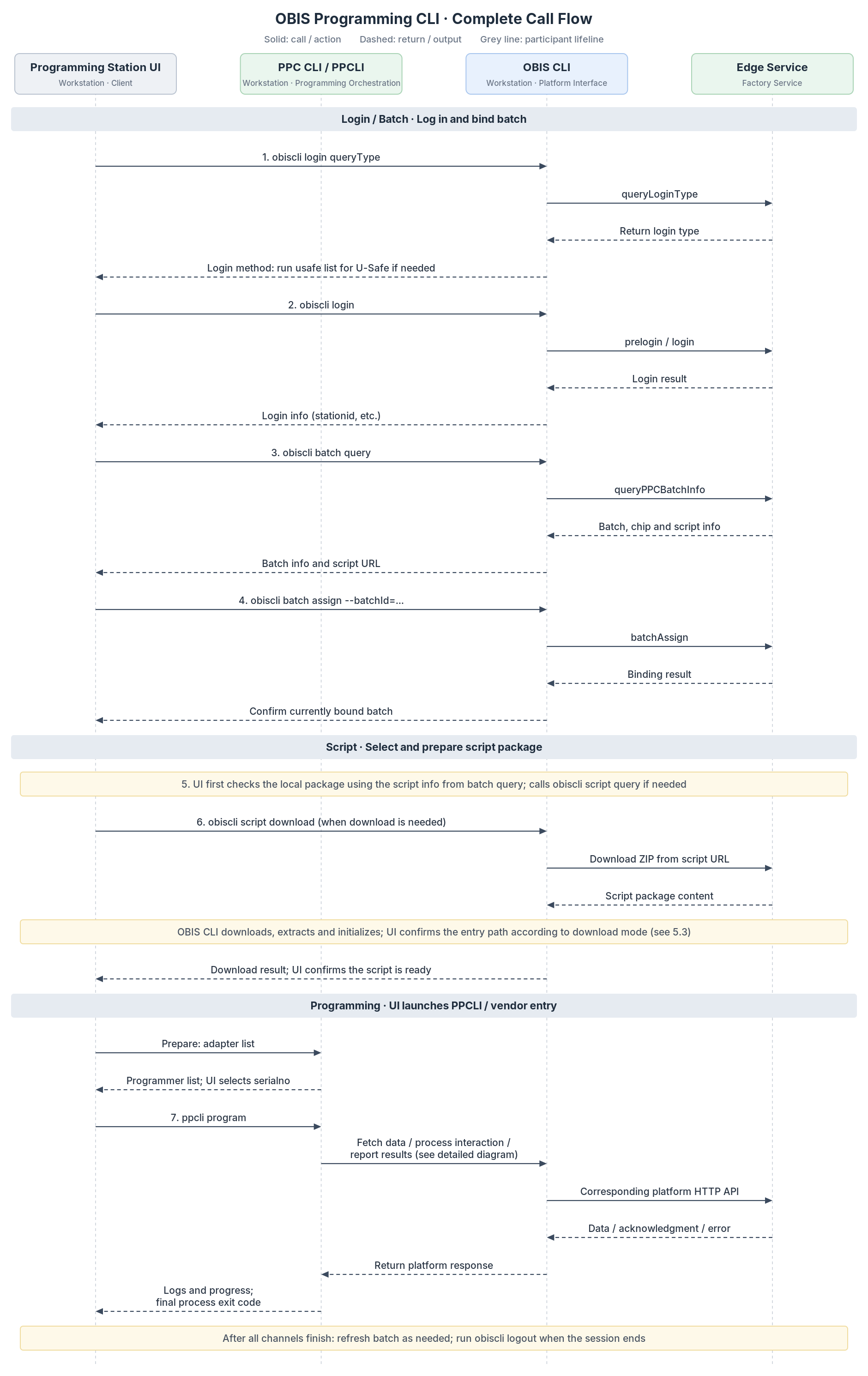
| Stage | Caller → Receiver | Command / action | Prerequisite for next action |
|---|---|---|---|
| 1 | UI → OBIS CLI | login queryType; run usafe list if needed for U-Safe login | Obtain the login type and required identity information. |
| 2 | UI → OBIS CLI | login | Login succeeds; save the stationid required by the client. |
| 3 | UI → OBIS CLI | batch query; or batch queryList for an order | Obtain full batch information and identify batchId, chip, and programming script. A list containing only IDs cannot replace full batch information. |
| 4 | UI → OBIS CLI | batch assign | Batch assignment succeeds; subsequent programming uses the current assigned batch. |
| 5 | UI | Prefer script URL, name, and version or digest from batch query; run script query if needed. | Decide whether to reuse a matching local package or download it again. |
| 6 | UI → OBIS CLI | script download | Download, extract, and initialize the package; locate its actual entry directory. Skip download if a prepared package is already cached. |
| 7 (prepare) | UI → PPCLI / package entry | adapter list | List available adapters successfully and select the target serialno. |
| 7 | UI → PPCLI / package entry | program | Read programming output in real time, wait for process completion, and handle success, failure, or a result reporting error. |
| Finish | UI → OBIS CLI | Run batch query to refresh batch statistics if needed; run logout at session end. | End the login session after programming and result reporting have finished on all channels. |
Step 5 should use the programming script information returned by batch query first. The UI need not always call script query; call it only if the flow requires more information. Batch responses may have an outer wrapper that varies by version. Parse the actual OBIS Programming CLI output rather than assuming its JSON structure from a raw HTTP response.
6.2 Programming Stage Call Flow
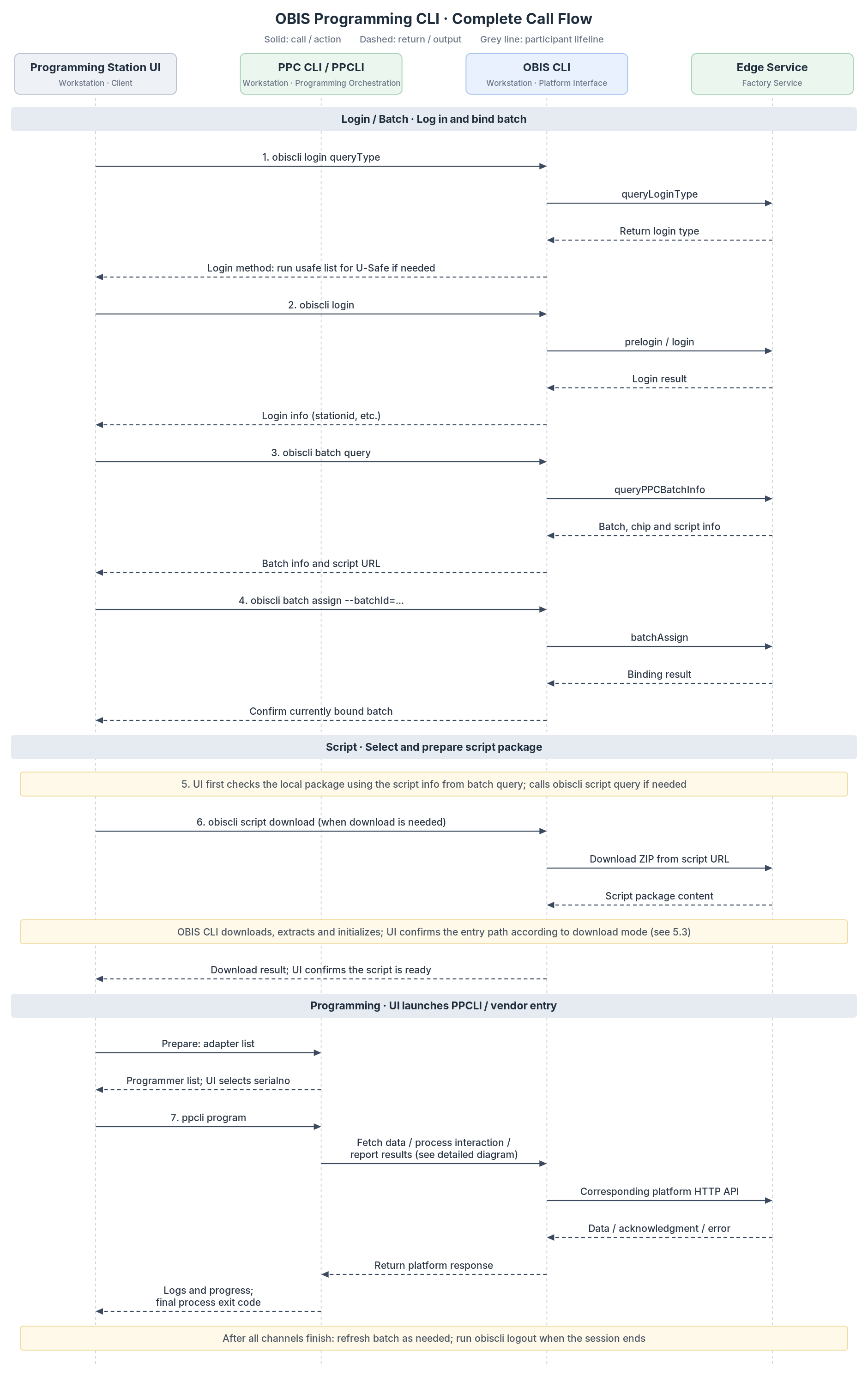
This section describes stage 7 of the overall flow, including how the UI starts programming, retrieves programming data, programs the device, and reports the result.
- getChangingData and getFixData are OBIS Programming CLI commands for changing and fixed device data. Their HTTP endpoints are getProgrammingData and getMetadata, respectively; do not confuse CLI command names with HTTP endpoint names.
- If fixed data is cached, getFixData may be skipped.
- The chip and batch configuration determine device erase, Device ID retrieval, CSR/DAC processing, Factory Data writing, firmware programming, reset, and other steps.
- Non-Matter devices or flows without device-generated CSRs may not include CSR/DAC processing.
- putdata exchanges data and requests/responses during programming, for example CSR/DAC requests; its HTTP endpoint is uploadRequestData.
- putresult reports the final programming result; its HTTP endpoint is programmingResult. putdata and putresult have different purposes and are not interchangeable.
The diagram shows a typical Python PPCLI flow. The internal flow of the dedicated Telink interface depends on the delivered version.
6.3 Complete Command Example
This example shows the basic command sequence from Edge Service login through device programming. It uses Python PPCLI and Windows cmd.exe syntax. Set actual parameters according to the site, batch, and programming script package. Confirm that each step succeeds before proceeding. Python PPCLI and the dedicated Telink interface are alternative entry points; select the one provided by the package.
REM 1. Query login type; run obiscli usafe list if needed for U-Safe login
obiscli login queryType --ip="<EDGE_IP>" --port=32333
f
REM 2. Log in using the type returned by queryType; this example uses passwordless login
REM For password login add --password="<PASSWORD>"; for U-Safe login add --usafesn="<USAFE_SN>"
obiscli login --ip="<EDGE_IP>" --port=32333 --stationVersion="<UI_VERSION>"

REM 3. Query batch information including batchId, chips, and scriptUrl
obiscli batch query

REM 4. Assign the current batch
obiscli batch assign --batchId="<BATCH_ID>"

REM 5. Get scriptUrl from the batch response; check for a matching prepared local package

REM 6. Download when no usable local package exists
obiscli script download --url="<SCRIPT_URL>"

REM Locate the actual entry directory from the download result and change directory
cd /d "<SCRIPT_ENTRY_DIRECTORY>"

REM 7 (prepare). List adapters and select SERIALNO
".\python-3.12.9-embed-amd64\python.exe" ".\ppcli.py" adapter list --chipVendor="<CHIP_VENDOR>" --type=1

REM 7. Start device programming
".\python-3.12.9-embed-amd64\python.exe" ".\ppcli.py" program --chipVendor="<CHIP_VENDOR>" --chipPart="<CHIP_PART>" --serialno="<SERIALNO>" --speed=115200 --type=1

REM Check the exit code after program completes; the UI should read the child exit code directly rather than rely on this echo
echo %ERRORLEVEL%

REM Refresh batch statistics if needed
obiscli batch query

REM Log out after programming and result reporting finish on all channels
obiscli logout
When using the dedicated Telink interface, replace only the stage 7 adapter query and programming commands:
REM 7 (prepare). List Telink adapters and select SERIALNO
".\Cmd\_download\_tool.exe" adapter list --chipVendor="TELINK" --type=telinkevk

REM 7. Start device programming
".\Cmd\_download\_tool.exe" program --serialno="<SERIALNO>"
The login, batch assignment, and programming script preparation flow remains the same. Use the executable path and working directory from the delivered Telink package.
6.4 Programming Script Download and Entry Directory
This section explains how the UI locates the actual programming entry point after downloading the script.
When only --url is passed, script download uses the default cache directory. The scriptExist and path values in its response indicate whether the script already exists and where it is located.
If both --savePath and --extractFolder are specified, the UI should not assume the command output contains the actual entry path. Locate the entry point from the chosen extraction directory and package structure, and verify that the entry executable and dependencies exist.
--savePath specifies the downloaded file directory. A programming script ZIP can contain one or more nested directories, so the download directory may differ from the actual programming entry directory.
Before starting, perform the initialization and dependency checks required by the package.
6.5 UI Process and Result Handling
This section describes process startup, output reading, and result handling when the UI calls PPCLI or a dedicated Telink programming executable.
| Item | Integration requirement |
|---|---|
| Process startup | Set executable (path), args[] (arguments), and cwd (working directory) separately. Prefer an absolute executable path and shell=false to start the target process directly. Argument values in args[] need no extra shell quoting. |
| Parameter sources | Chip vendor and model come from the selected batch; serialno comes from adapter list of the selected programming entry point. Determine type, speed, and entry path from package configuration. |
| Output reading | Read stdout and stderr continuously and asynchronously until the process exits and output reading completes, so an unconsumed stream cannot block the process. Python PPCLI usually uses UTF-8; check the actual output encoding of older EXE versions. |
| Adapter output | Parse the complete adapter list response as defined by the package. Handle an empty list, missing fields, unexpected output, and nonzero exit codes. Parse multiline JSON as a complete response, not as separate JSON on each line. |
| Programming output | Programming output may contain logs and events; do not parse all stdout as a single JSON object. The Python PPCLI version reviewed may emit [Progress]:<value>% or [Finish]. for progress or completion and {"errMsg":"..."} on failure. Other packages may use different formats. |
| Success criteria | Wait for normal process termination, then evaluate the exit code and final result defined by the package. Reaching 100% progress or emitting [Finish]. indicates progress or flow completion only; do not release the channel early or treat either alone as proof that the platform received the result. |
| Result reporting | Check whether a putresult reporting failure affects the script's final status. If not, verify the platform record separately. A change in batch statistics alone does not prove that a particular uuid was reported successfully. |
| Failure, timeout, or cancellation | Retain serialno, package version, exit code, stdout, stderr, and any uuid obtained. Never mark a timed-out or terminated process successful. Before retrying, check device state and the previous result to avoid obtaining duplicate programming data or certificates. |
| Concurrency | One active programming task corresponds to one serialno. Actual concurrency depends on the package, driver, and service. While tasks share an OBIS login session, do not switch the current batch, log out, or replace the package in use. |
6.5.1 UI Process Invocation Example
This example shows how the UI organizes process arguments when starting Python PPCLI. It does not define new CLI parameters or a fixed interface format:
executable: path to the Python executable;args: commands and arguments passed to Python PPCLI;cwd: actual entry directory of the programming script;shell:falsein this example, so the target process starts directly without running the full command through a shell.
{
  "executable": "<ENTRY_DIRECTORY>\\python-3.12.9-embed-amd64\\python.exe",
  "args": [
    "<ENTRY_DIRECTORY>\\ppcli.py",
    "program",
    "--chipVendor=<CHIP_VENDOR>",
    "--chipPart=<CHIP_PART>",
    "--serialno=<SERIALNO>",
    "--speed=115200",
    "--type=1"
  ],
  "cwd": "<ENTRY_DIRECTORY>",
  "shell": false
}
6.6 Integration Verification
This section lists key scenarios to verify after integrating the programming interface into the UI.
| Verification item | Verification scope |
|---|---|
| Normal flow | Verify login, batch query and assignment, script preparation, adapter query, single-device programming, process exit status, platform record confirmation, and logout. |
| Parameters and paths | Verify directories and chip vendor names containing spaces, preservation of leading zeros in serialno, and correct executable, working directory, and type mapping. |
| Device errors | Verify that the UI ends tasks correctly and retains errors when no device is present, a device is unplugged, serialno is wrong, or a device is busy. |
| Platform errors | Verify that device data retrieval, certificate request, and result reporting failures are distinguished and that reaching 100% progress alone is not treated as success. |
| Multiple devices | Verify that cached and freshly downloaded packages both start; serialno and uuid stay separate across channels; and the shared batch and login session remain unchanged during programming. |

 Download User Manual